Understanding HTML Tags and Elements
What HTML is and why we use it
HTML = skeleton of a webpage.
Just like your body needs bones to have structure, a webpage needs HTML to define what exists on the page.
HTML tells the browser:
This is a heading.
This is a paragraph.
This is an image.
This is a button.
What is an HTML tag?
Think of a tag like a label stuck on content.
Example:
<p>Hello World</p>
Here:
<p>→ opening tag</p>→ closing tagHello World→ content
Opening tag, closing tag, and content
<h1>→ starts the element</h1>→ ends the elementI am a heading→ content inside
Think of it like a box:
Opening tag = opening the box
Content = item inside
Closing tag = closing the box
What is an HTML element ?
Tag ≠ Element
Tag is just the label.
Element is the whole thing together.
Example:
<p>Hello</p>
<p>→ tag</p>→ tag<p>Hello</p>→ element
Element = opening tag + content + closing tag
Self Closing Elements
Some elements don’t wrap content.
Example:
<img src="photo.jpg">
<br>
<hr>
They don’t have closing tags.
They exist on their own.
Because there’s nothing to put inside them.
Block level vs Inline elements
Block-level elements
Take full width
Start on a new line
Examples:
<h1>Heading</h1>
<p>Paragraph</p>
<div>Container</div>
Inline elements
Take only required space
Stay in the same line
Examples:
<span>Text</span>
<a>Link</a>
<strong>Bold</strong>
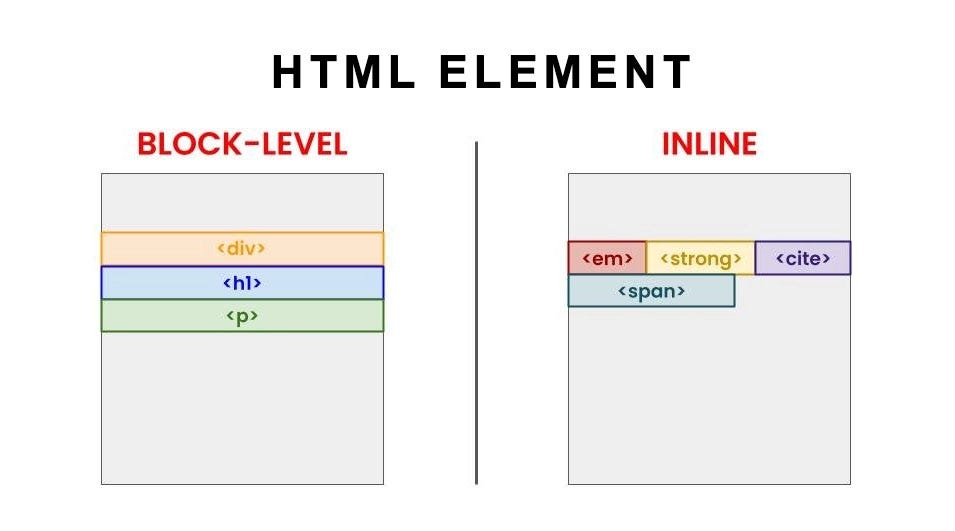
Commonly used HTML tags
Text
<h1> to <h6>   → headings
<p>           → paragraph
<span>        → inline text
Structure
<div> → generic container
Links & media
<a>           → link
<img>         → image
Line & spacing
<br>          → line break
<hr>          → horizontal line
Pro tip: Inspect HTML in the browser
Right-click any website → Inspect.

You’ll see:
real HTML
real tags
real structure
Conclusion
HTML gives structure to a webpage by defining what elements exist, like headings, text, and images.
Once the structure is clear with HTML, styling and behavior can be added later using CSS and JavaScript.
